The best Gemini Omni prompts read like a director's brief: who's on screen, what they do, how the camera moves, how it looks, and what it sounds like. Then you refine the result with short follow-up edits instead of rewriting everything. That's the core of prompting Gemini Omni, and this guide shows you how to do it well.
Gemini Omni is Google DeepMind's any-to-any video model, and since it replaced Veo in the Gemini app, it's also what you're prompting whenever you ask Gemini to make a video. So every tip here works for "Gemini video prompts" in general, whether you use the Gemini app, Google Flow, the API, or OmniRender. If you're new to the model, read What is Gemini Omni? first.
Below you'll find the prompt formula, a vocabulary cheat sheet, how to prompt audio, timing, references, edits and extensions, and 32 copy-paste Gemini video prompts you can use today.
The anatomy of a great Gemini Omni prompt
Google's own prompt guide organizes a video prompt around a handful of elements: framing and camera motion, style, lighting, location and action. We add two more that matter just as much with Omni: sound and constraints.
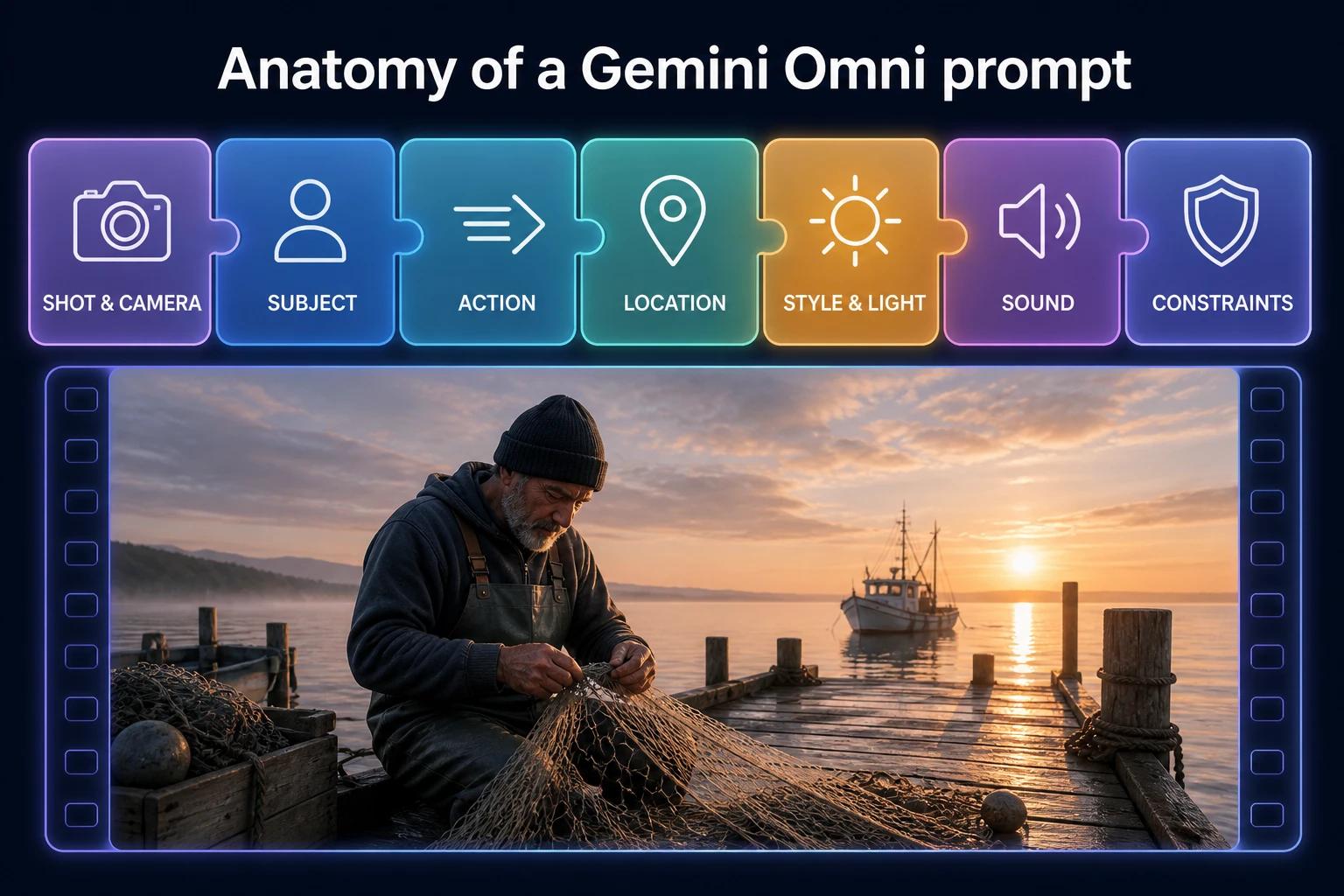
| Element | Question to answer | Example phrase |
|---|---|---|
| Shot and camera | How is it framed, and how does the camera move? | "Low-angle tracking shot," "slow push-in," "locked-off wide" |
| Subject | Who or what is on screen? | "A tired nurse in blue scrubs," "a matte black wireless speaker" |
| Action | What happens, in what order? | "She sets down her coffee, then laughs at her phone" |
| Location | Where are we? | "A rooftop garden in Tokyo," "an alien desert with turquoise pools" |
| Style | What should it feel like? | "Grounded documentary," "1990s VHS home video," "stop-motion claymation" |
| Lighting | Where does the light come from, and what's the mood? | "Late-afternoon sun through blinds," "cold neon from a vending machine" |
| Sound | Music, ambience, dialogue? | "Lo-fi beat, rain on glass, she says: 'Not again.'" |
| Constraints | What must or must not happen? | "Single continuous shot," "no text on screen," "no music" |
How much detail does Omni need?
Less than older video models, and that's one of its biggest differences. Omni draws on Gemini's knowledge of physics, history and culture, so it fills in sensible details on its own. A prompt like "a 1920s jazz club in Harlem" already implies the costumes, the instruments and the lighting.
The rule of thumb: describe what matters to you precisely, and let Omni handle the rest. More detail gives you more control, but you don't need to describe every frame. If the result drifts, add detail only where it went wrong.
Fill-in-the-blank template
Copy this, replace the brackets, and delete any line you don't need:
[Shot type and camera movement] of [subject with 1–2 defining details]
[doing the main action], [then the second action].
Setting: [location, time of day, weather].
Style: [realistic / cinematic / anime / claymation / documentary ...].
Lighting: [source and mood].
Audio: [music style or "no music"], [ambient sounds], [dialogue in quotes].
Constraints: [single continuous shot / no text / no extra people ...].
Camera, style and lighting cheat sheet
Gemini Omni understands real film vocabulary. Using the right term is faster and more reliable than describing the effect.
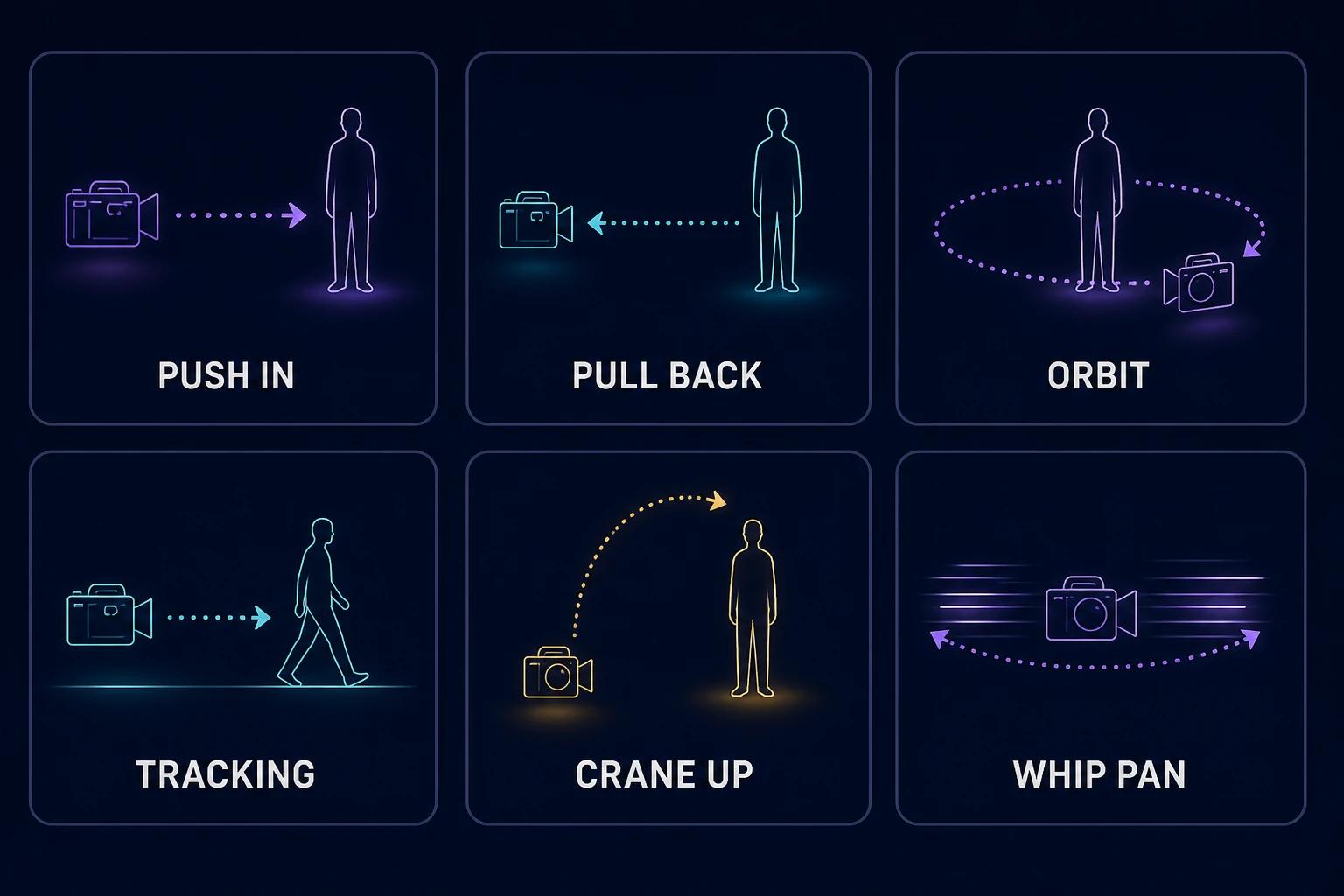
Camera moves and shots
| Term | What you get |
|---|---|
| Push in / dolly in | Camera moves toward the subject, building tension or focus |
| Pull back / dolly out | Camera moves away, revealing the wider scene |
| Punch in | Fast, sudden cut-in to a tighter frame |
| Dolly zoom | Background warps while the subject stays the same size (the "vertigo" effect) |
| Tracking shot | Camera follows the subject as it moves |
| Orbit | Camera circles around the subject |
| Whip pan | Very fast horizontal pan, often used as a transition |
| Crane up / drone rise | Camera lifts up and over the scene |
| Static / locked off | Camera doesn't move at all |
| Handheld | Slight natural shake, documentary feel |
| One continuous shot / "oner" | No cuts for the whole clip |
| POV | Through the eyes of a character |
| Over-the-shoulder | Frame from behind one character, facing another |
| Close-up / extreme close-up | Face or detail fills the frame |
| Low angle / high angle | Subject looks powerful / small |
You can also name a camera type: "natural smartphone zoom," "16mm film camera," "webcam style," "security camera footage" or "GoPro on a helmet."
Styles that work well
Photoreal cinematic, documentary, 1990s VHS, Super 8 film, anime, glossy family-animation 3D, stop-motion claymation, felt puppet, watercolor, pencil sketch, risograph print, voxel art, low-poly 3D, glass and crystal, paper origami, and "make it look like a vintage TV commercial."
Lighting words
- Natural: golden hour, blue hour, harsh midday sun, overcast and soft, dappled light through trees.
- Practical: neon signs, streetlamps, candlelight, a single desk lamp, a glowing phone screen.
- Studio: softbox key light, rim light, high-key white, low-key with deep shadows.
- Mood: warm and nostalgic, cold and clinical, ethereal haze, high contrast noir.
How to prompt audio, dialogue, timing and text
This is where Omni pulls ahead of most video models, and where most people under-prompt.
Sound and music
Omni generates audio with every clip. If you don't describe it, the model picks something, which isn't always what you want. Tell it:
- Music: "calm piano in the background," "high-energy techno beat," "a tinny radio playing a 1950s song in the distance."
- Ambience: "rain on a tin roof," "busy café chatter," "wind across an empty field."
- Silence or realism: "no music, just realistic sound."
Dialogue
Put spoken lines in quotes and say who speaks: The woman in the red coat turns and says, "You're late." Omni lip-syncs the line. Describe the delivery if it matters (whispered, shouted, sarcastic) and add an accent if you want one. Want silence? Add "no dialogue."
Timing and pacing
You can schedule events in plain language ("after 3 seconds, the lights go out") or with timestamps:
[0-3s] A boxer wraps his hands in a dim locker room.
[3-6s] He stands, rolls his neck, and walks toward the door.
[6-10s] The door opens onto a roaring arena flooded with light.
This also works for rapid-fire edits: "every second, cut to a different city skyline at night."
Scene structure: one shot or several?
By default, Omni often plans a few shots to tell a mini story. If you need one unbroken take, say so: "single continuous shot, no scene cuts." If you want cuts, ask for them explicitly with timestamps.
Text on screen
Omni renders readable text, and it can sync it to the action. Spell out exactly what each piece of text says and how it appears: Bold white captions appear one word at a time, in time with the beat: "THIS. CHANGES. EVERYTHING." If your scene naturally contains text (shop signs, number plates, a whiteboard), define it too, or the model will invent it.
Meta prompting
You can ask Omni to apply general principles to the whole clip:
- "Pay attention to micro-expressions and natural timing."
- "Be very specific about costume design and set dressing."
- "Fill the background with realistic, natural detail."
Prompting with references, frames, edits and extensions
Reference images and videos
References are how you keep a character, product or style consistent. The key is to tell Omni what role each reference plays.
On OmniRender, drop files into the prompt box and tag them with @:
@[image1] is a barista. She hands a latte to @[image2] across the counter of a cozy café. The cup has the logo from @[image3]. Warm morning light, gentle jazz, café chatter.In the Gemini API, use tags such as <IMAGE_REF_0> and <VIDEO_REF_0> (numbering starts at 0). You can also mix roles, for example a style reference and a subject reference: in the style of <IMAGE_REF_0>, the man <IMAGE_REF_1> walks through a market.
Tips:
- Use sharp, well-lit images, one subject per image.
- Video references (up to 3 clips of 3 seconds) are best for likeness and motion. Their audio is ignored.
- To use an image only as guidance, say so: "use this sketch only as a guide for the movement; don't show the sketch."
First and last frame
State three things: what's in the first frame, the exact camera move or transition, and what the last frame reveals. Always add "one continuous shot, no jump cuts."
Start on a close-up of a coffee bean in a roaster. The camera pulls back in one continuous move through the factory, out the window, and up into the morning sky, ending on the wide shot of the city in the last frame. One continuous shot, no jump cuts.Use the same image as first and last frame to create a seamless loop.
Edit prompts: shorter is better
The biggest prompting mistake with Omni is over-describing edits. Long edit prompts change things you didn't mention. Keep edits to one change, and end with "Keep everything else the same."
| Instead of this | Write this |
|---|---|
| "In the video of the woman jogging, please replace the gray sky with a beautiful orange and pink sunset and make the light warmer on her face as she runs." | "Change the sky to a sunset. Keep everything else the same." |
| "Remove the coffee cup she's holding and fill in the space so it looks natural." | "Make the coffee cup invisible. Keep everything else the same." |
More edit prompts that work well:
- "Make this video claymation."
- "Add light snowfall."
- "Change his jacket to a yellow raincoat."
- "Change the camera angle to a close-up on her hands."
- "The street lamps flicker on one by one, in time with the beat."
- "Change the sign to say 'OPEN 24 HOURS'."
Extension prompts
With Gemini Omni 1.1 Flash, you extend in 10-second steps up to 40 seconds. Omni uses the last 10 seconds as context, so describe only what happens next:
- Continue: "The scene continues. She opens the letter and her face drops."
- Cut: "Cut to the same two characters walking out of the station at night."
- Audio: "The music swells into the chorus."
- New character: "The dog from @[image1] runs into frame and jumps on the sofa."
Remember that timestamps restart at 0 for each extension.
32 copy-paste Gemini video prompts
Every prompt below is written for Gemini Omni and works in the Gemini app, Google Flow, the API or OmniRender. Copy one, swap in your own subject, and generate. Prompts that use @[image1] need an uploaded reference image (on OmniRender, drop the file into the prompt box; in the Gemini app, attach the photo).
Cinematic and storytelling prompts
1. Rain-soaked noir
Low-angle tracking shot of a detective in a long gray coat walking through a rain-soaked alley at night. Red and teal neon signs reflect in the puddles. He stops, lights a match, and says quietly, "Somebody's been here." Film noir style, high contrast, 35mm film grain. Rain, a distant saxophone, footsteps. Single continuous shot.2. Epic landscape reveal
Crane up from a lone hiker standing on a narrow ridge to reveal a vast valley of glaciers at sunrise. Wind whips her red jacket. Photoreal, epic scale, soft pink light on the ice. Swelling orchestral score and wind gusts. No dialogue.3. Sci-fi cockpit
Slow push-in on an astronaut in a cramped spaceship cockpit as warning lights flash amber. She flips three switches and exhales. Through the window, a gas giant drifts into view. Grounded sci-fi realism, lit only by the control panel. Alarms beeping, muffled engine hum. She whispers, "Come on, come on."4. Emotional family moment
[0-5s] Over-the-shoulder shot in a quiet kitchen at night: an elderly man slides a faded photograph across the table to his granddaughter.
[5-10s] Close-up on her face as she looks at the photo, then at him, and smiles through tears.
Warm tungsten light, intimate documentary style. A clock ticks. He says softly, "That's your grandmother, the summer we met."
Product ad and marketing prompts
5. Hero product shot
Studio product shot of a matte black wireless speaker on a glossy black surface. The camera orbits 180 degrees as water droplets bounce on the speaker grille in time with a deep bass beat. Low-key lighting with a thin blue rim light. At the end, bold white text appears: "FEEL EVERY BEAT." No dialogue.6. UGC skincare testimonial
Vertical handheld smartphone video. A woman in her 20s in a sunlit bathroom holds a small glass serum bottle up to the camera and says, "Okay, three weeks in, and look at my skin." She taps a drop onto her cheek and smiles. Natural window light, casual and authentic. Room tone only, no music.7. Food commercial
[0-5s] Macro slow-motion shot of melted cheese stretching as a slice of pizza is lifted from a wood-fired oven tray, steam rising.
[5-10s] Cut to a wide shot of friends laughing around a rustic table.
Warm golden light, appetizing commercial style. Crackling fire, upbeat acoustic guitar. Someone says, "Okay, who ordered extra cheese?"
8. Retro 90s commercial for your startup
A 1990s mall TV commercial for a budgeting app called "PocketPig." An over-the-top presenter in a neon windbreaker points at the camera and shouts, "Save money like it's 1995!" Bright primary colors, VHS grain, cheesy star-wipe transitions, upbeat synth jingle. End on a big chunky logo with the text "PocketPig: on your phone today!"Social media and trending prompts
9. My dog, but he's a news anchor
@[image1] is a serious TV news anchor in a tiny suit, sitting behind a news desk. A "BREAKING NEWS" banner appears and the ticker reads "SQUIRREL SPOTTED IN BACKYARD." He barks once. Static news-studio framing, bright studio lights. Dramatic news theme music. A voice-over says, "We go live to the backyard."10. POV surprise at the door
Vertical POV video: you open your front door and a golden retriever wearing tiny sunglasses is holding a pizza box in its mouth. It tilts its head. Natural smartphone footage, slight handheld shake, bright afternoon light. Doorbell, dog sniffing, a voice off-camera laughs, "No way." No music.11. Oddly satisfying ASMR
Overhead close-up of a knife slicing a smooth cube of glossy pastel kinetic sand into thin layers. Each slice falls over in slow motion. Soft, even light. Crisp ASMR cutting sounds, no music, no dialogue. Single continuous shot.12. Talking-head hook with captions
Vertical video. A young man in a home office points at the camera and says, "Stop scrolling. This one trick saved me two hours a day." Bold yellow captions appear word by word, in sync with his speech. Quick punch-in on "two hours." Natural daylight, light lo-fi beat.Photo to video prompts
13. Bring an old family photo to life
Bring this old family photo to life. The people smile, blink and shift naturally while a light breeze moves the trees behind them. Keep the faces, clothing and vintage colors exactly as in the photo. Subtle film grain, soft birdsong. No music, no dialogue.14. Portrait to cinematic shot
Use @[image1] as the first frame. The camera slowly pushes in as she turns her head toward the window and smiles. Her hair moves gently in the breeze. Keep her appearance identical. Soft natural light, shallow depth of field, gentle piano.15. Pet photo animation
Animate @[image1]: the cat stretches, yawns widely, then curls up and closes its eyes. Locked-off shot, cozy afternoon light. Soft purring and rain on the window. No music.16. Sketch to real footage
Turn this sketch into realistic footage. Treat the drawing as a layout and motion guide only, and don't show it in the video. A red vintage convertible drives along the coastal road from the sketch at sunset as waves crash below. Drone tracking shot. Engine purr and ocean ambience.Drone, travel and real estate prompts
17. Drone coastline reveal
Cinematic drone shot flying low over turquoise water toward a white-sand beach, then rising to reveal a small island village with terracotta roofs. Late-afternoon sun, crisp detail, travel-film style. Wind, waves and uplifting acoustic music. No text.18. FPV drone through a city
FPV drone dives from the top of a skyscraper, weaves between buildings and skims over a busy night market full of paper lanterns. Fast and smooth, one continuous shot. Neon and warm lantern light. Rushing air, crowd noise and a driving electronic beat.19. Real estate walkthrough
Smooth gimbal walkthrough of a modern apartment: enter through the front door, glide through a bright open-plan living room with oak floors, and end at floor-to-ceiling windows overlooking the city at golden hour. Clean, airy real estate showcase style. Soft ambient music. No people, no dialogue.20. Fast travel montage
[0-2s] A train window with snowy mountains rushing past.
[2-4s] A steaming bowl of ramen on a wooden counter.
[4-6s] A temple gate in morning fog.
[6-8s] A busy crosswalk at night in the rain.
[8-10s] A traveler smiling on a rooftop at sunset.
Cut on every beat. Upbeat lo-fi hip hop, warm film look.
Dance and music video prompts
21. Rooftop contemporary dance
A dancer in a flowing yellow dress performs a contemporary routine on an empty rooftop at sunrise. The camera orbits her in one continuous shot, matching her spins. Soft cinematic light, city skyline behind. Emotional piano and strings, with her steps landing on the beat.22. Trend dance in a hallway
Vertical video of four friends doing a synchronized hip-hop dance in a school hallway. Static wide shot, then a quick punch-in on the final pose. Bright fluorescent light, sneakers squeaking, catchy upbeat pop beat. On the last beat they all freeze, then burst out laughing.23. Indie music video
Music video for an indie rock song. A guitarist plays alone in an empty laundromat at 2 a.m. while the dryers spin in rhythm. Handheld, 16mm film grain, green fluorescent light. Every 2 seconds, cut to a new angle. Raw, distorted guitar riff, no vocals.24. Kinetic typography
Kinetic typography video. The words "WE RUN THE NIGHT" appear one at a time, each with a different animated style, in perfect sync with a heavy drum beat. Bold sans-serif type in neon pink and electric blue on black. No dialogue.Animation and stylized prompts
25. Anime opening about your group chat
Anime opening sequence for a show about a group chat of five friends. Fast character introductions, each with a name on a bold title card, dramatic wind and falling cherry petals, ending in a group pose on a school rooftop. Vibrant cel-shaded anime style. Energetic rock theme song, no dialogue.26. Claymation science explainer
Stop-motion claymation explainer of how a volcano erupts. Everything is made of clay: rock layers, a glowing magma chamber, pressure building, then a slow-motion eruption. Scientifically accurate, playful style, no hands visible. A friendly narrator explains each step in one short sentence.27. Watercolor storybook
Children's storybook in soft watercolor style. A small fox in a blue scarf carries a lantern through a snowy forest and finds a rabbit family sheltering under a log. Gentle camera drift, warm lantern glow against cool blue snow. Soft music-box melody. A warm narrator says, "And that night, nobody was cold."28. Three-style transformation
A skateboarder kick-flips down a set of concrete stairs. The clip moves through three styles, about 3 seconds each: realistic footage, then a pencil sketch with cross-hatching, then glossy low-poly 3D. Keep the action and camera identical, with seamless morphs between styles. Ambient synth score.Birthday, event and explainer prompts
29. Birthday surprise video
Birthday video for Maya, who is turning 30. A cozy living room decorated with gold balloons. The camera pushes in on a chocolate cake as the candles light themselves one by one. Confetti bursts and a banner on the wall reads "HAPPY 30TH, MAYA!" Friends off-screen shout, "Surprise!" Warm, joyful party music.30. Save-the-date invitation
Elegant save-the-date video. Slow dolly along a table set with white roses and candles in a sunlit garden. Handwritten gold text fades in: "Sam & Alex, June 14, 2027, Lisbon." Dreamy, airy film look. Soft strings and birdsong, no dialogue.31. Flat-design finance explainer
Clean flat-vector explainer of how compound interest works. A single coin grows into a stack, then a tower, while a line graph rises beside it. Labels appear in sync: "Year 1," "Year 10," "Year 30." Bright, friendly colors on a white background. Calm upbeat music and a clear narrator, one sentence per step.32. Historical recreation
Documentary-style recreation of a busy Roman market in the 1st century AD. Merchants sell olives and pottery, a child chases a chicken, and sunlight cuts through the dust. Slow tracking shot along the stalls. Historically accurate clothing and architecture. Market chatter, no music.8 common Gemini Omni prompting mistakes
- Writing edit prompts like generation prompts. Edits should be one short sentence plus "Keep everything else the same."
- Forgetting the audio. If you don't specify sound, Omni chooses for you. Always name the music (or "no music") and key ambience.
- Asking for too much in 10 seconds. One location, one main action and one or two beats is the sweet spot. Use scene extension for longer stories.
- Not asking for a single shot. If you want one unbroken take, say "single continuous shot, no scene cuts," or Omni may add cuts.
- Vague motion on image-to-video. "Make it move" is weak. Describe what moves, how fast, and what the camera does.
- Leaving background text undefined. Signs, screens and labels appear naturally in scenes. Write what they should say.
- Not tagging reference roles. Tell Omni which image is the person, which is the outfit and which is the style.
- Starting over instead of iterating. Omni remembers the scene. Refine the clip you have, one change at a time.
Need help with the basics of the tool itself? Our step-by-step guide to using Gemini Omni Flash covers settings, workflows and access options.
Gemini video prompt FAQ
What is the best prompt for a Gemini video?
The best Gemini video prompts name the shot and camera move, the subject, the action, the setting, the style and lighting, and the sound, in that order. Add constraints like "single continuous shot" or "no music" when they matter. The 32 prompts above follow this structure.
Do Gemini video prompts work the same as Gemini Omni prompts?
Yes. Gemini Omni has replaced Veo as the video model in the Gemini app, so a Gemini video prompt is a Gemini Omni prompt. The same prompts work in Google Flow, the Gemini API and OmniRender.
How long should a Gemini Omni prompt be?
For generation, two to five sentences is usually enough. Omni infers sensible details from its world knowledge, so describe what matters to you and skip the rest. For edits, one short sentence works best.
Can I write Gemini Omni prompts in other languages?
You can, and many work well, but English is the only language Google has fully evaluated. For the most reliable results, write the prompt in English and keep dialogue in any language you like.
Does Gemini Omni support negative prompts?
Not as a separate field. Write exclusions into the prompt itself, for example "no text on screen," "no extra people" or "no dialogue."
Is there a Gemini video prompt generator?
You can ask Gemini itself to expand a short idea into a detailed video prompt, which Google also suggests. Or use the fill-in template in this guide: it covers every element Omni responds to.
How do I make a photo-to-video prompt in Gemini?
Upload the photo, then describe the motion and camera precisely, for example "the camera slowly pushes in as she turns toward the window and smiles." Say whether the photo is the first frame or just a reference, and ask Omni to keep the subject's appearance identical.
Put these prompts to work
The fastest way to improve is to run a prompt, then edit the result twice. You'll learn more from three iterations than from one perfect prompt.
Try these prompts free on OmniRender: the free plan includes enough credits for a few 360p videos a month, no card needed. When you're ready for 4K and references, Gemini Omni 1.1 Flash is the default on every plan.
Sources
- How to create effective prompts with Gemini Omni, Google DeepMind
- Gemini Omni Flash prompt guide (API docs), Google AI for Developers
- Gemini Omni model page, Google DeepMind
- Gemini Omni in the Gemini app, Google